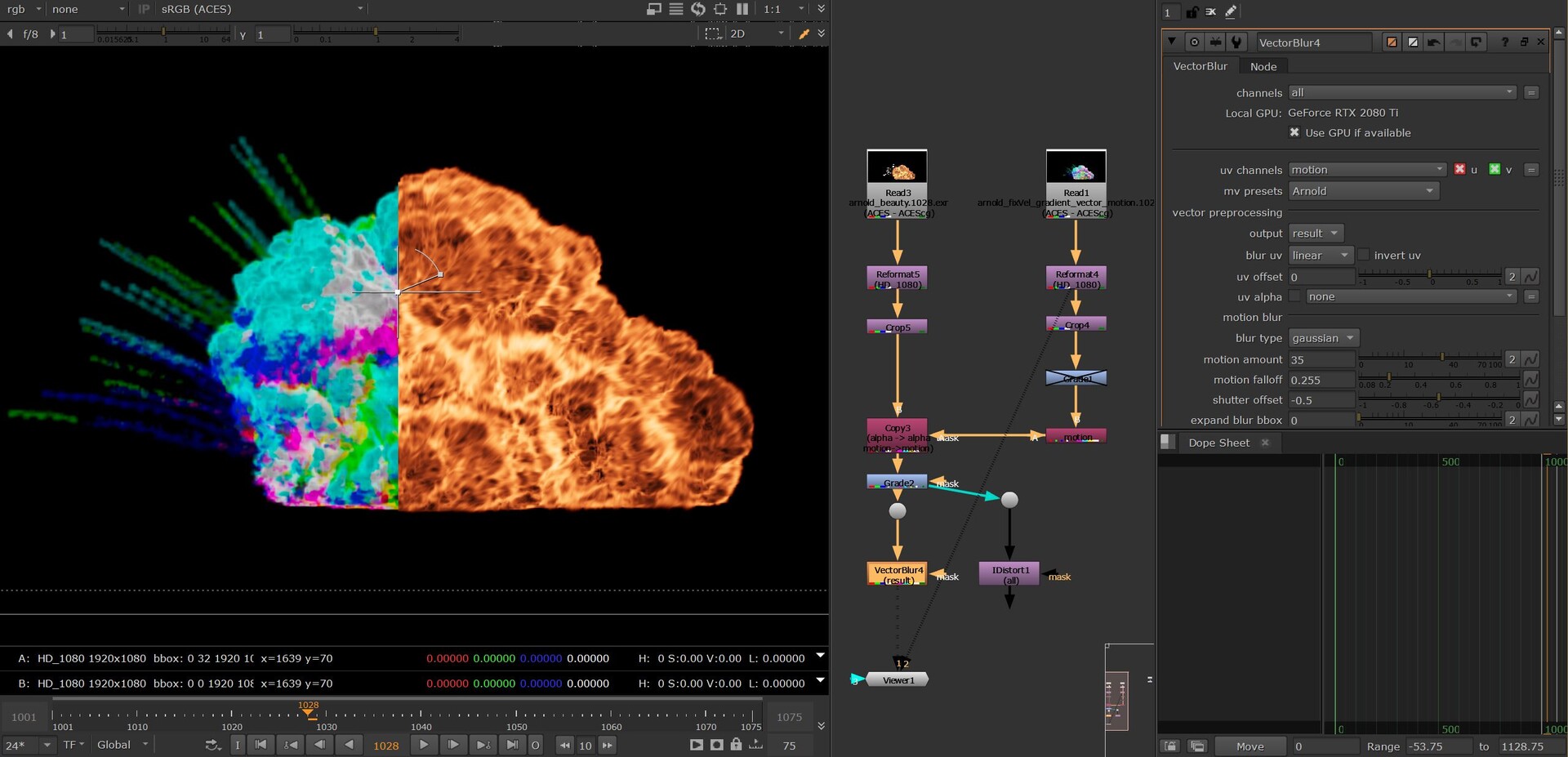
Render Houdini Arnold Volume Motion Vector For Compositing
Just want to share my small journey in research about this. (For Houdini FX, I am still a learner)
This is quick tips how to do it incase any body need, this is 2023 and seem Arnold does not support AOV volume motion vector yet. https://www.youtube.com/watch?v=K7ox8ZrqcT8
Normally every render program will easily render motion vector AOV from geometry as mesh in just a few clicks, but that is not the case so easy on volumetric. The use of volume motion vector-based into compositing programs like Foundry Nuke and After Effects helps cinematic, VFX production much faster, flexible in post-process adjustment. So the objective is to render motion vector AOV (render pass) for VDB volume from Houdini Arnold render will be needed, this is the adaptation of advanced technical development method to make it come true. This video demonstration my success in research * experiment while studying.
About the journey into volume motion vector-based. That a whole story that cost me 4 days to complete. Arnold motion vector AOV only generates for geometry mesh, that equal for other render programs in Houdini, there is Arnold's shader state employs render ray which you can force the shader over the space to show you nearly at the sweet spot https://bit.ly/3q32lMt but it is not.
Volume motion vector-based, surprisingly for me this is a huge topic in 2016 Pixar develop a method "Efficient Rendering of Volumetric Motion Blur Using Temporally Unstructured Volumes", paper: http://jcgt.org/published/0005/01/01/ which use a volume lattice (now we used it is a volume deform in Houdini) they apply the technology for SOUL movie production which used the volume lattice to produce volume displacement motion blur by REVES.
Here their applied technology into volume crowd effect, Rasterizing Volumes and Surfaces for Crowds on Soul, Paper link: https://bit.ly/3gnDO1q
CGwiki (which is an amazing Houdini dictionary, speak less, I still watch Learning Houdini: You're Doing It Wrong and How to do it Right from Matt Estela until now for multiple times), so Cgwiki was the place takes me to that volume knowledge while I want to do volume motion vector AOV and I thought it should be pretty simple until I read this https://bit.ly/3wndDNV
So it turns out that, even now 2021, to have volume motion vector render pass we have to struggle to get it, so Arvid Schneider helps to guide me directly on how to do that in his awesome Breakdown Deep Dive Project, by employ volume normal so you can have the displacement and then input into the Arnold volume shader. I went to many places asked the same question about how to do it, without any result, only Arvid, he was so generous to show me in his Discord, hugely appreciated.
But that implement for my case is not enough, Arvid used that to create displacement force field effect in his video, what I need is motion blur from velocity for the explosion (don't bother the explosion visual looks, that is a quick shelf tool just suit my experiment), so when showed as a personal discovery up here, I was blown away this small experiment I am doing for study and reduce production time that made many people interests. So thankful to all the encourage and fun comments that made me have to review.
By the last weekend with the help from so talent and kindful Jaron Wilding (FXTD at Rebelway where I learned Master Destruction, Water FX, Magic, FX lvl 2, sci-fi visualization .. in Houdini) to solve critical steps which put the render pass totally displacement motion blur by post-process into the volume data before input into volume shader, that produce the proper data for the volume motion vector. The final step I put down minor custom volume shader to make everything crystal clear.
Lesson learned.
---------------------
A Vietnamese version detail of my journey in research Volume motion blur vector-based into compositing, this method helps cut down render time, easy to adjust in compositing software:
This how it works
This is the quick tips to show how to do HTOA Arnold in Houdini volume motion vector AOV
Pause the video to see Vex, just multiply vector field `vel` to gradient.
30s Houdini Arnold render motion vector | compositing motion blur tutorial